
If your brand has a common English name, tracking brand mentions with a social listening tool will show you wrong mentions. Take Linear, the project management software. A search for “Linear” will also find posts about linear equations.
At Mentionkit, we start with the keyword match, then classify it against your project’s context. This process removes contextually wrong matches(eg apple the fruit vs apple the tech company) and sorts the remaining mentions into high and low score groups.
This guide shows each step and how it works when you test it with your own brand.
Why tracking brand mentions with a common name is hard
Imagine you’re tracking Linear. Its name also describes things that follow a straight line. Traditional social listening tools can find posts about linear equations, graphs, and regression.
A common fix is to require another word. For Linear, you could require project management or app. But you’d lose relevant mentions such as “Has anyone heard back from Linear support?” because it uses neither term. You could also exclude regression, but then lose a post about a Linear issue for a regression feature.
Old school social listening tools like Brand24, Talkwalker, etc that use Boolean search let you build more precise rules. They need more work when people talk about your brand in ways you did not predict.
How Mentionkit filters each common-name mention
Mentionkit uses AI to filter mentions contextually. Here’s how you can set it up.
Start by creating a project. Add what your business does and who it helps. Then add your brand name as a keyword and choose the platforms you want to monitor.
Mentionkit uses your business info in two checks:
- Find and screen a keyword match. When Mentionkit receives a post that matches your keyword, it will first use AI to check if the post is contextually relevant, using your project details. It removes clear wrong-brand uses, spam, and other unrelated posts. If the post is unclear, it moves forward.
- Read more context and score the post. The next check reads the post and available discussion context. It puts a useful brand mention or specific customer question in the high score group. It puts a weak match, generic update, ai slop, or a post with no clear next action in the low score group.
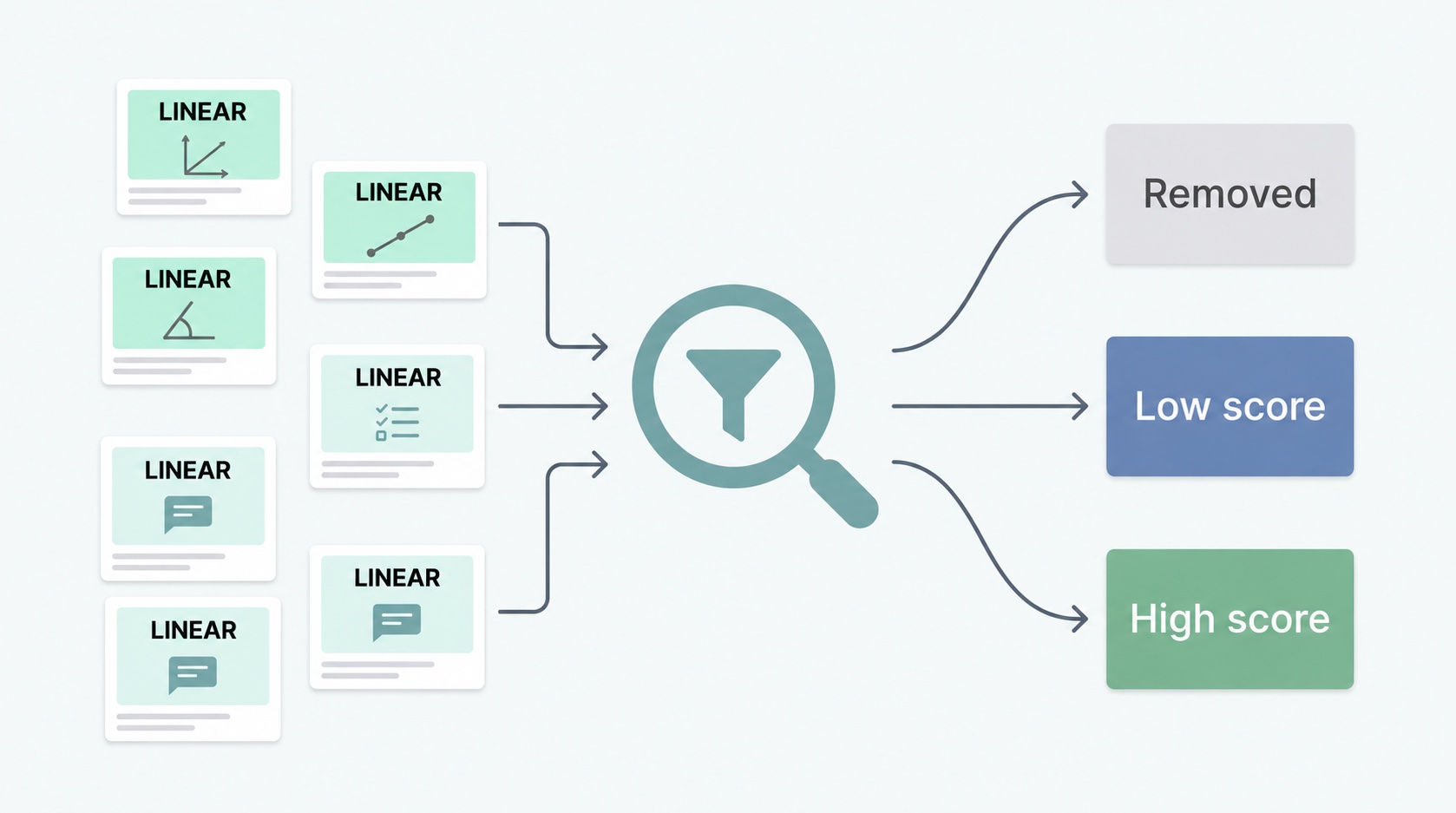
High score means the mention needs a reply. It can be a complaint, a product question, a comparison, or direct talk about your brand. Low score remains available. A post removed in the first check does not enter the mention feed at all.
Here are some example posts that use the word Linear. These are made-up posts, not results from a customer account.
| Post with “Linear” | Likely result | Reason |
|---|---|---|
| “Is this equation linear?” | Removed | Post is about math, not the project management app. |
| “Linear posted another product update.” | Low score | Post names the brand, but gives you little to act on. |
| “How do you assign an issue in Linear?” | High score | Person asks about the product and has a clear need. |
This is why we keep removal separate from low score. One mention is clearly about something else. Another is about the right brand but needs no reply now. A keyword-only search will treat both as matches.
Our AI can still make a wrong call. A short post, joke, or a name shared by two products can be hard to judge. We try to get you 99% of relevant posts but you still need to view the high/low score mentions and see how the filtering works. And you can tune the AI filtering to make it more/less strict based on your requirements.
How to set up and check your mentions
I’ve been told by my customers we’re one of the better tools to help find them contextually relevant mentions.
But don’t take my word on it, do a quick test for your common word brand name.
- Describe your brand. Add your product, customers, and the problems it solves to your Mentionkit project. Mentionkit will extract your project details automatically and setup AI classifier but you can always update these settings.
- Add the name and close variants. Track your brand name, product name, domain, and known spellings as separate keywords where useful. Choose the platforms where your customers post.
- Save known posts. Keep links to a few posts that are about your brand and a few that use the same word in another way. Check whether the relevant posts arrive and where Mentionkit places them.
- Check both score groups. Check high scores for work to do. Check low scores for brand mentions that need a reply.
Check the mentions you wanted to find. Most people are surprised at the unique mentions they get for their brand once they signup and setup their project.
You can also read more about older social listening tool’s boolean filters, and the differences in our guide to why Boolean search is outdated for social listening.
Conclusion
I hope this guide explained how Mentionkit’s AI classifier works for finding common word brands.
You can get started with tracking your own brand today by signing up to Mentionkit, adding your common-name brand as a keyword, and a few competitor keywords.
Check the high and low score groups, then see if there are any misclassifications. Keep the brand description current as your product changes. This gives you a useful way to judge Mentionkit with your own posts.