
KWatch looked like a cheap way to track keywords across social sites. The $19 plan covers six sources and adds AI sentiment, so I expected a basic product that did the main job well.
My test fell apart almost at once.
I’m Shash, the founder of Mentionkit. I created a KWatch account and signed up for its $19 per month Essential plan with my own card. I tested the product myself in July 2026.
My short KWatch review is simple: KWatch is alright for basic alerts, but it brings nothing new to the table. The Facebook feature failed in my test, I could not find an inbox for mentions, and the AI analysis is very thin. The dated UI made the whole product feel less solid than it should.
My KWatch test: what happened
KWatch lets you monitor keywords on Reddit, X, Hacker News, LinkedIn, Facebook, and YouTube. It sends alerts by email, Slack, or webhook, based on your plan. It also tracks replies to selected Reddit and Hacker News conversations.
It is a very straightforward product. Pay $19 p/m to get alerts for keywords on X, Facebook, Reddit, etc.
Facebook group tracking failed
Facebook group tracking was the most interesting KWatch feature for me. Its documentation says you can paste the URL of a public Facebook group into an alert.
This is great for local businesses who want to know when someone is asking for recommendation, alternatives, etc. And Facebook famously locks down their product so nobody can effectively do social listening on Facebook, and other Meta properties like Threads, Instagram, etc.
So I tried it with a public group. KWatch showed an “Invalid Facebook group URL” error. I then tried several forms of the URL, including the normal group URL and other versions copied from Facebook. The same error kept coming back.
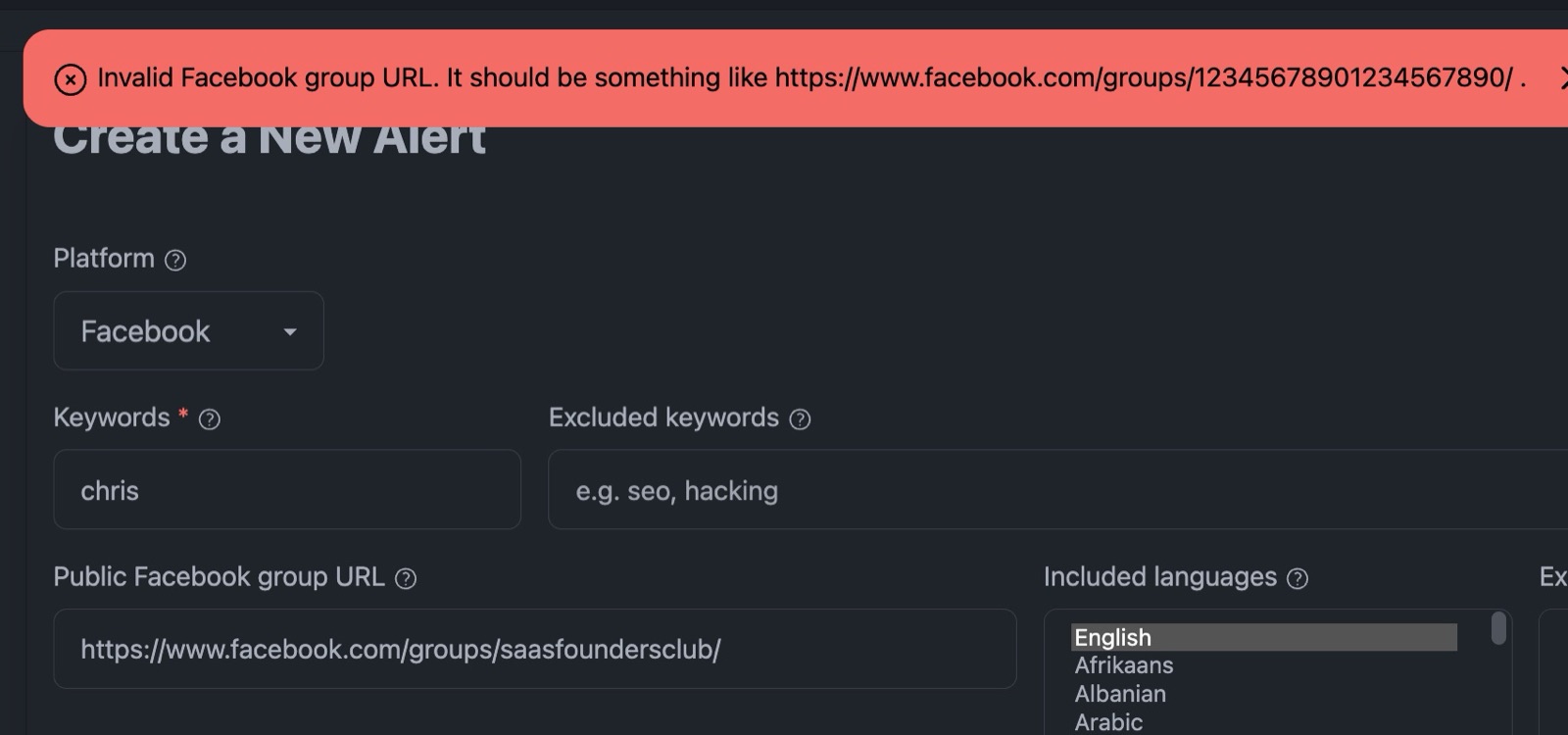
The form itself showed an example with a numeric group ID. Many Facebook groups use a named URL. KWatch says it supports public groups, so the setup should handle a common public group link or explain the limit before submission.
A basic Facebook keyword alert gave me nothing
I removed the group URL and created a plain Facebook keyword alert. The form submitted this time, but I got no alerts. I also got no old mentions or useful result to confirm that tracking worked.
KWatch openly says it only watches new content and does not search social media history. In other words, there is no backfill. You start with an empty account and wait for a new match. Mentionkit backfills existing mentions, so you can check the keyword and source soon after setup.
Backfill is super useful when setting up keywords. It helps you see whether your keyword is too broad, too narrow, or full of junk before you wait days for an alert.
I skipped conversation tracking
KWatch can watch a Reddit or Hacker News post and tell you when someone adds a comment. I skipped this part. Reddit already has post notifications, and this feature did not feel important enough to save the rest of the product.
Profile tracking sent me to another product
I clicked Profile Tracking in the dashboard. It took me to a separate product called MultiFollow.
WTF?
KWatch’s own home page now says MultiFollow is one of its “other monitoring services.” The dashboard still presents Profile Tracking like part of KWatch. Sending me into a different product made the account feel stitched together.
There is no proper mention inbox
I searched the dashboard for an inbox or feed where I could review all the alerts. I could not find one. The navigation lets you create and edit alerts, set notification channels, and open AI analysis. There is no clear central feed for reading mentions, marking them done, adding notes, or assigning follow-up.
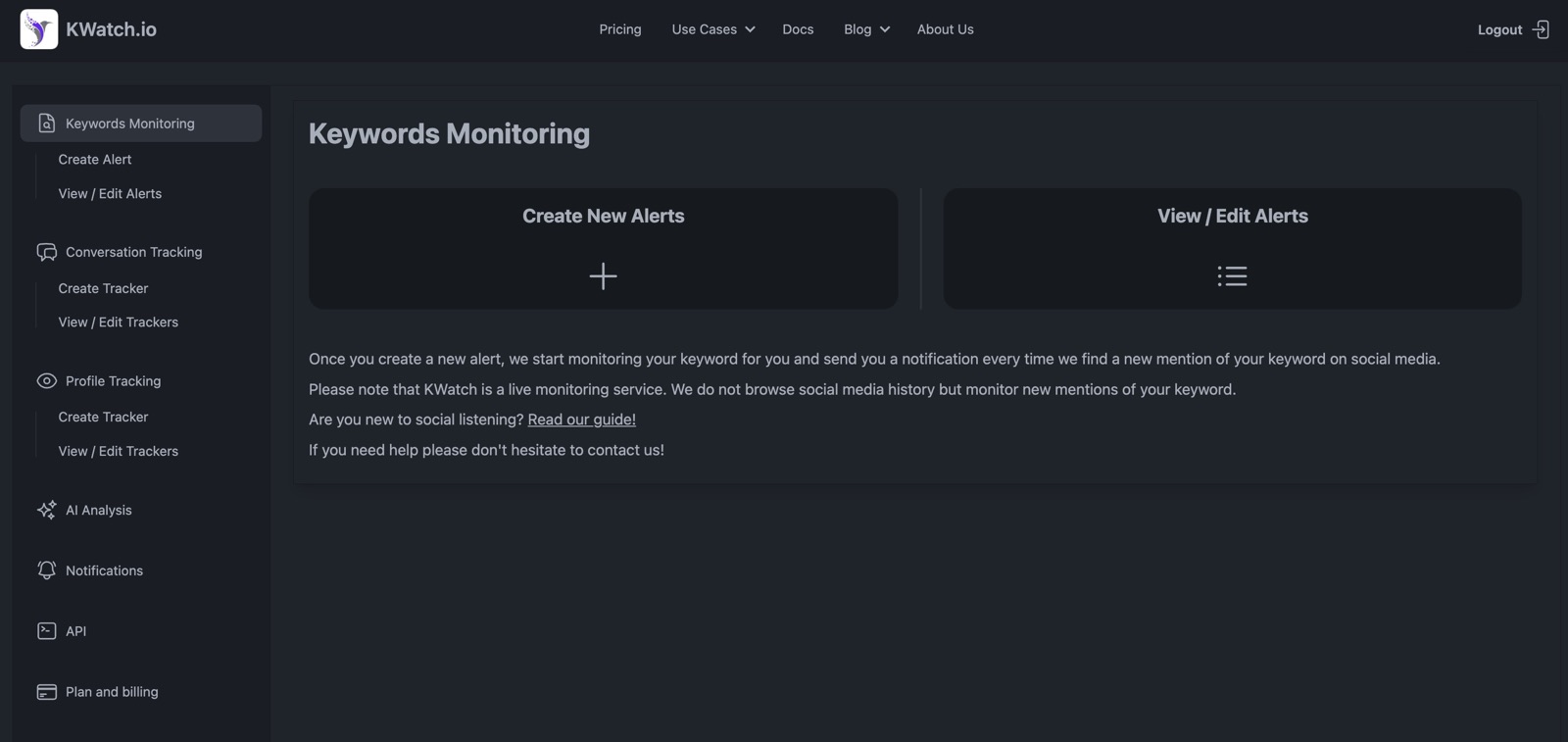
KWatch feels like an extremely simple alert delivery tool. Email alerts can work for one person with two keywords. But once you start doing this for many different keywords it becomes cumbersome.
The UI feels dated and crummy
The UI is usable. It is also dated, cramped, and rough around the edges. Large empty areas sit beside small controls. The dark panels and side menu look like an old admin template. Several parts feel like separate tools put under one menu.
I could finish the main tasks, but the product felt like it might break apart at any time.
AI analysis is incredibly barebones
KWatch labels tracked mentions as positive, negative, or neutral. Its AI page then plots sentiment over time. That is the whole idea.
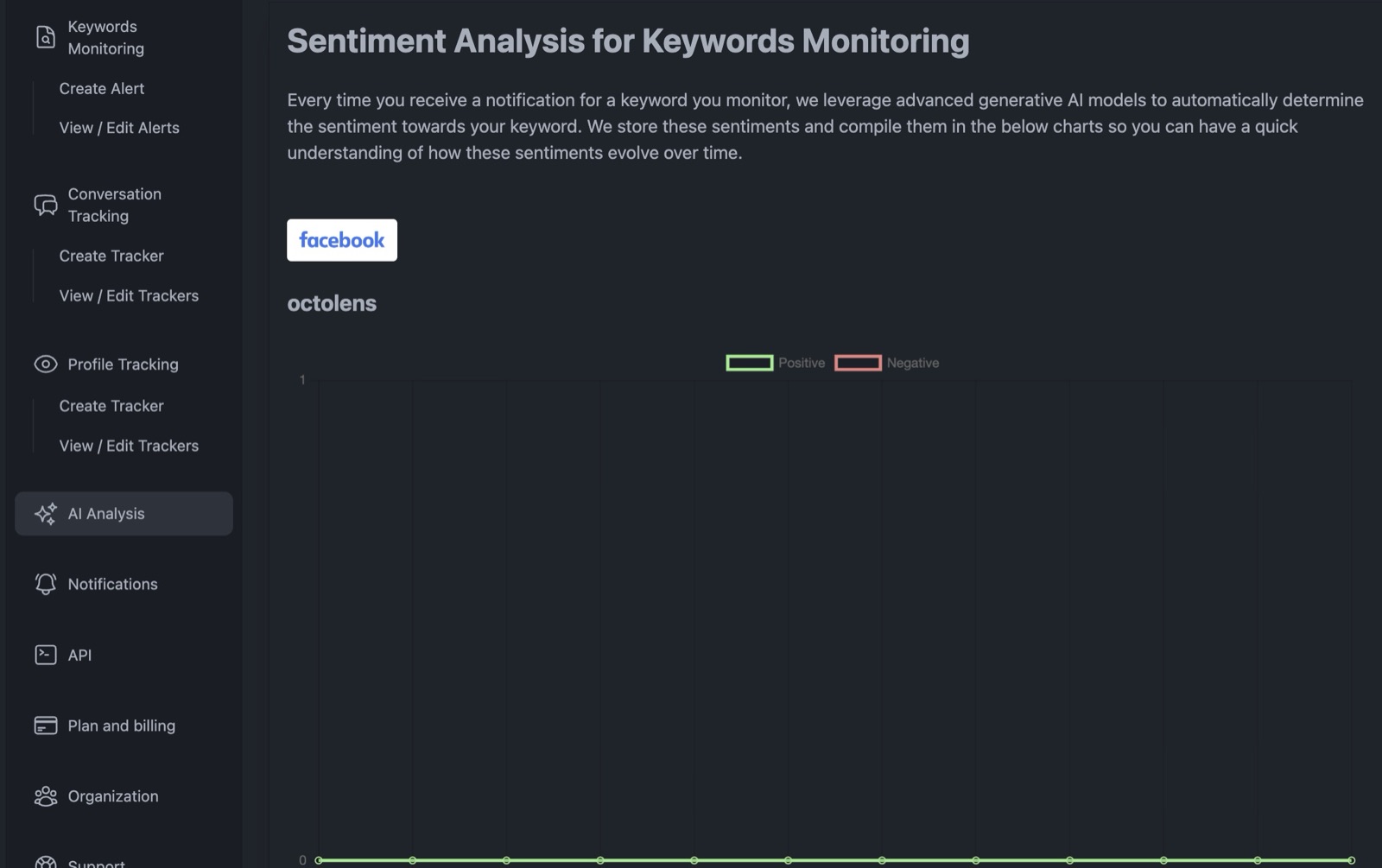
The chart needs enough new mentions before it becomes useful. Since KWatch has no backfill, a new account can sit on an empty chart.
Sentiment tracking is for competitor comparisions and seeing how brand awareness programs work out. It does little to tell you which post is asking for alternatives, what needs a reply, or what your business should do next.
KWatch pricing: cheap at first, limited in practice
KWatch has four listed plans plus a custom agency option. These were the public monthly prices when I checked on July 15, 2026.
| Plan | Price | Main limits and features |
|---|---|---|
| Free | $0 | 2 Reddit alerts, 2 Hacker News alerts, no other sources, no AI, API, webhooks, Slack, or saved results |
| Essential | $19 | 20 Reddit and Hacker News alerts, 2 each for X and YouTube, 1 each for Facebook and LinkedIn, AI sentiment, no API, webhooks, Slack, bulk import, or multi-user access |
| Business | $79 | 100 Reddit and Hacker News alerts, 10 each for X and YouTube, 5 each for Facebook and LinkedIn, plus API, webhooks, Slack, bulk import, and multi-user access |
| Enterprise | $199 | Higher alert limits, API, webhooks, Slack, bulk import, multi-user access, and advanced support |
| Agency | Custom | Multi-client setup and custom limits |
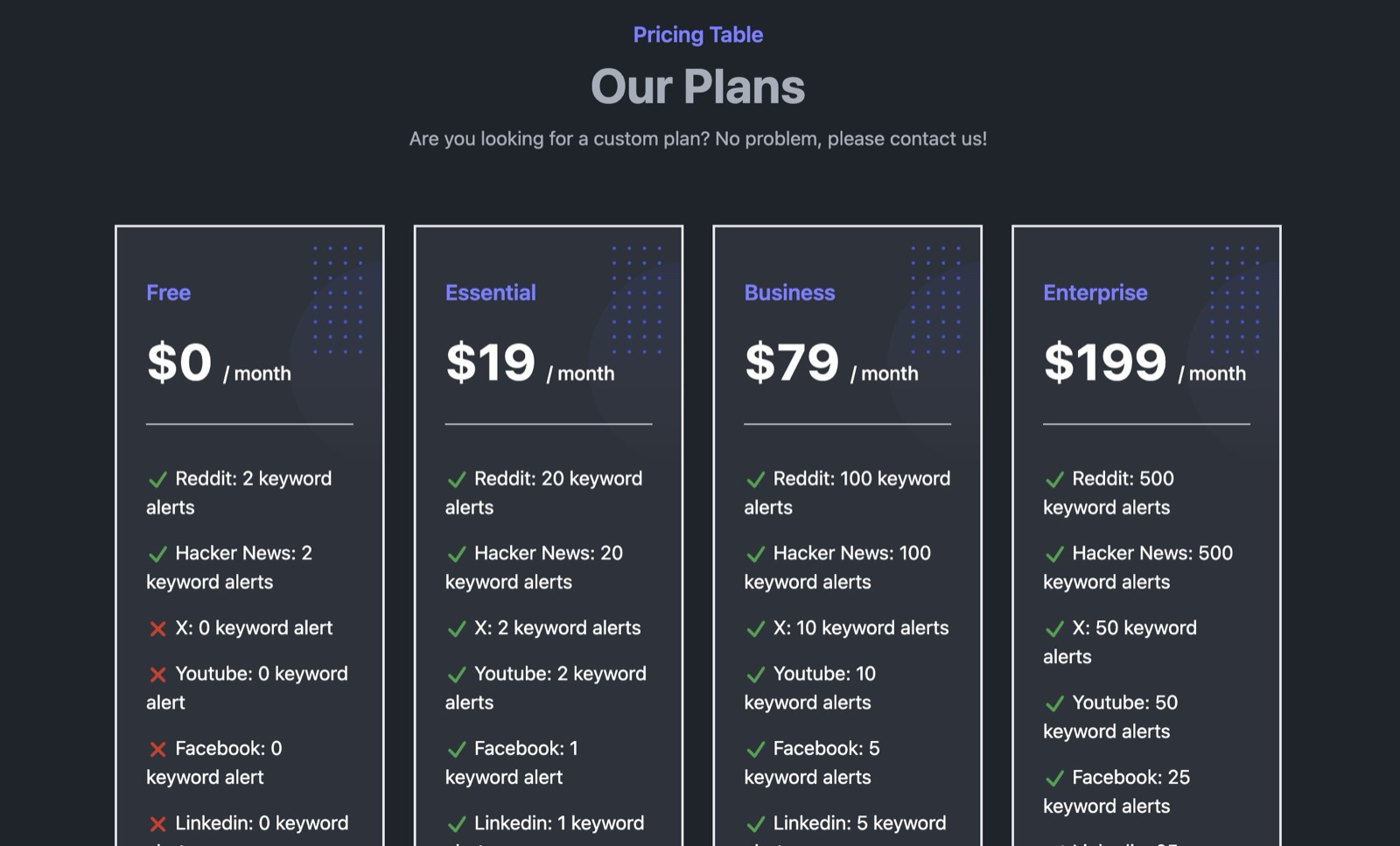
The Free plan is useless for serious work. It is directly tied to the same basic use case as F5Bot: Reddit and Hacker News alerts sent to your inbox. F5Bot already covers that simple job for free and offers far more keywords.
$19 starter price sounds good until you see the odd source limits. You get 20 Reddit alerts but only one Facebook alert and one LinkedIn alert. Slack, API, webhooks, bulk import, and multi-user access start at $79.
KWatch does not support MCP access. I found no MCP feature in its site, docs, API pages, or pricing table. Even the $199 Enterprise plan lists API, webhooks, and Slack with no MCP. This makes KWatch a poor fit if you want an AI agent in Codex, Claude, or Cursor to work with mention data.
KWatch vs Mentionkit
Mentionkit does pretty much everything better for a business that wants to act on mentions. It costs more at the first paid step, but you get a full workflow instead of another stream of email alerts.
| Feature | KWatch | Mentionkit |
|---|---|---|
| Starting paid price | $19 per month | $30 per month |
| Backfill after setup | No | Yes |
| Central mention feed | No clear inbox found | Yes |
| AI help | Basic sentiment | Relevance, useful tags, and reply drafts |
| Ownership and follow-up | No | Yes |
| Reports | No | Yes |
| API and webhooks | From $79 per month | Included on all paid plans |
| MCP access | No | Yes |
| Main workflow | Create alerts and wait | Track, review, reply, assign, and report |
If you want a wider feature check, read our direct Mentionkit vs KWatch comparison. You can also compare KWatch with the other products in our top social listening tools for 2026.
Conclusion
KWatch is alright if you want basic keyword alerts and care about one of its six supported sources. The $19 plan is cheap, and Facebook group tracking is an interesting idea when it works.
I would not pay for it again after this test. Facebook group setup failed, the plain Facebook alert gave me no starting data, Profile Tracking opened a separate product, and I found no proper inbox. The dated UI and empty sentiment chart made the product feel unfinished. Public reviews are too few to change my view.
If you only need free Reddit and Hacker News emails, use F5Bot. If you want a social listening workflow that helps you find, review, reply to, assign, and report on mentions, try Mentionkit. You will get useful data sooner, keep every mention in one feed, and have API, webhooks, and MCP ready for your own workflow.