
I use a social media monitoring API to put brand posts next to our support work. Each post needs its source link, so no one has to rely on a short alert preview.
What a social media monitoring API sends me
Each post needs text, site, date, search term, link, and a fixed ID. When we track more than one product, I save the project name too. The ID helps me stop repeat posts.
Some APIs add a score or the writer’s name. I use these to sort posts. I still open the source link before I reply or quote a post in a report.
Mentionkit lets me list mentions by platform, project, category, and score. It gives me a way to get the next page and lets me get up to 250 posts at once. I’d start with a small page.
Get posts into the feed
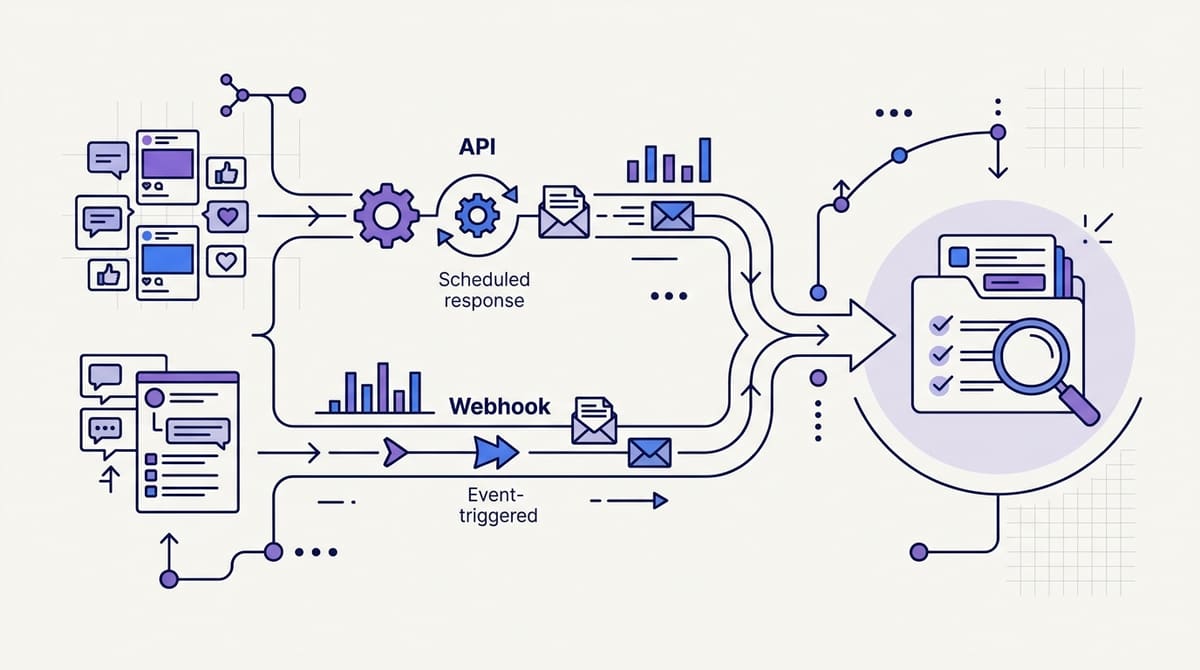
I get new posts from the API and save their IDs. I show the newest posts first. I save the next page marker so I can get more posts later. Each item links to its source.
For new posts, I can use a webhook. Mentionkit’s webhook docs say it sends a request after a run finds new posts. That request can hold more than one post. Old posts found later do not send a webhook, so I use the API to get them.
My first version has four steps:
- Create brand and competitor keywords in the monitoring product.
- Fetch the recent mentions and save their IDs.
- Receive new webhook batches and add unseen IDs to the feed.
- Let a person mark each item as reviewed, assigned, or done.
I test with our exact brand name first. I add wider terms only after I check the results. The Reddit keyword alerts guide shows how I pick terms.
I use Mentionkit’s inbox for the reply. I use the API when our support app also needs to show the post.
Check for missed webhooks
I check when webhooks arrive. Mentionkit sends them after it checks for new posts, so they don’t arrive at once. Its docs say it does not send a failed webhook again. I’d save each group we get and check the API each day for posts we missed.
I read the API access rules before I build. It needs a Bearer key. The rules must say how long I can keep post text and whether I can show it in our app.
I test a failed delivery too. After I turn the webhook receiver back on, the next API fetch should find the post it missed.
Conclusion
I wouldn’t launch this feed after one good webhook. I’d turn delivery off once and see whether the API fills the gap. If it doesn’t, staff could miss a customer post.